

The Google September 2026 spam update began rolling out on September 24, and if your rankings have felt a little off this week, you’re probably wondering what on earth just happened. Honestly, so are we. Google’s explanation so far is, to put it kindly, short.
Here’s what we do know. The update is global, it covers every language, and Google says it could take up to two weeks to finish. It’s also the fourth confirmed spam update of 2026. So before anyone starts deleting pages in a panic (please don’t), let’s walk through what’s confirmed, what isn’t, and how to check your site without making things worse.
What Google Has Confirmed About the September 2026 Spam Update
Google’s Search Status Dashboard shows the rollout started on September 24 at 9:15 a.m. Pacific time, and it applies worldwide, in every language.
The earlier spam updates this year landed in March, June and August. According to Search Engine Journal, they wrapped up in about 19.5 hours, a little over two days, and roughly two days and sixteen hours. Each came with a “few days” estimate. If you missed how the last one played out, we covered it in our August 2026 spam update breakdown.
This time the estimate is up to two weeks. That doesn’t mean it will actually take that long, but the longer window is worth noticing. What Google still hasn’t told us is which spam policy or tactic the update is aimed at.
What We Don't Know (and Why Guessing Backfires)
Within hours of any update, somebody online announces exactly what got hit. We’d take those claims with a big pinch of salt. Google’s spam update documentation describes these releases as notable improvements to its automated spam detection, and it doesn’t always name a target.
What the spam policies do give us is a handy review list: scaled content abuse, link spam, expired domain abuse, site reputation abuse, cloaking, hidden text and sneaky redirects. Treat it as a checklist, not a prediction.
How to Tell Whether Your Site Was Affected
Let the rollout settle
Rankings bounce around a lot while an update is live. Positions can drop, recover and drop again within days. Waiting until Google marks the rollout complete, plus a few extra days, gives you a far cleaner picture than panicking on day three.
Compare like with like in Search Console
Open the Performance report and compare a period after September 24 with an equal period before it, matching the same weekdays. Then look at clicks, impressions and average position together, not one at a time. Falling clicks with steady impressions tell a very different story from a drop in both.
Rule out other causes first
Not every dip is a spam problem, and we’ve seen that on our own site. A how-to post of ours on Google Business Profile posts lost more than 90 percent of its impressions in a single month, even though the page hadn’t changed. Google’s AI Overview had simply started answering that query directly. No spam involved at all. If your informational queries are the ones sliding, our guide to the Google AI Overviews report in Search Console shows how to check whether AI answers are soaking up the demand.
Look at pages, not just the whole site
Was the whole domain hit, or just one folder or page type? A drop that’s confined to a batch of similar articles points to a very different cause than a sitewide slide.
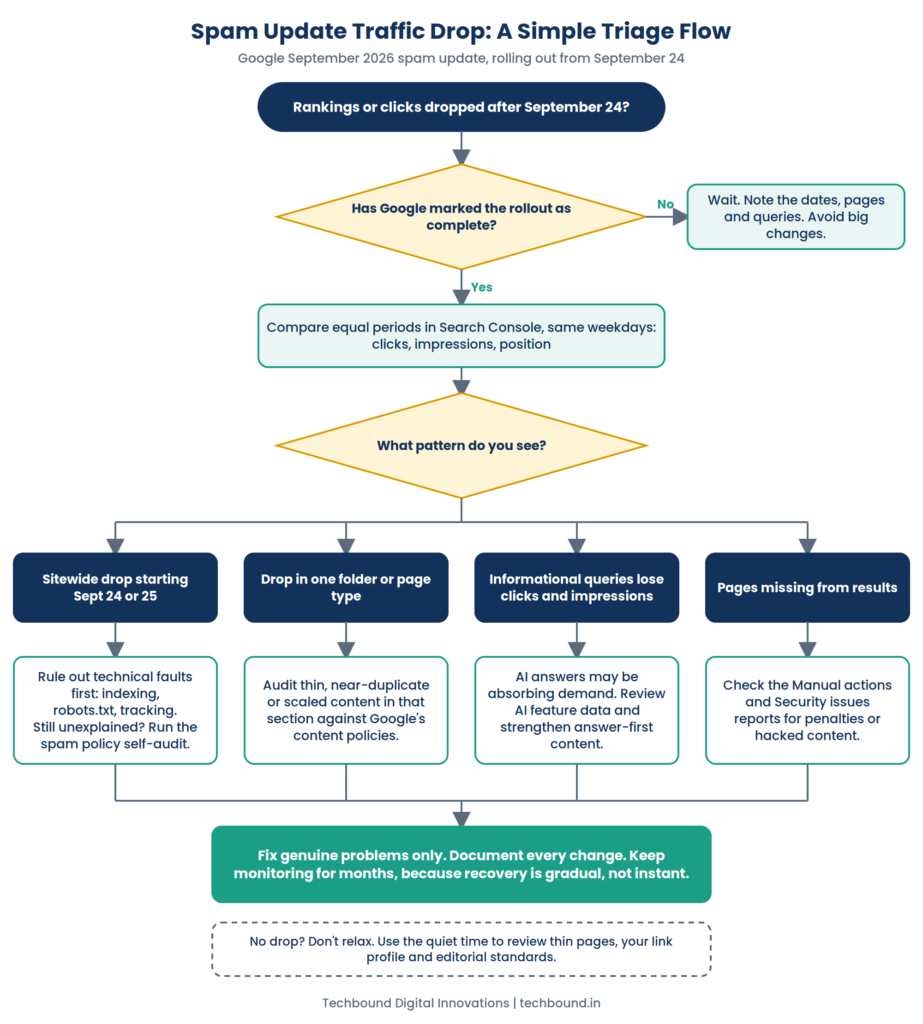
A Quick Triage Flow
Here’s the same thinking as a simple flow. Start at the top and follow whichever path matches what you’re seeing in the Search Console.
A Practical Spam Policy Self-Audit
Once the rollout ends, use the policies as your review list. In the audits we run, the same few issues keep turning up.
Content
Look for pages made at scale with very little original value: near-identical location pages, articles built around keywords, or automated content published with no real editing. Ask one honest question about each page. Would a knowledgeable person find this useful, or does it exist only to catch a search? Pages that fail that test are candidates for rewriting, merging or removal.
Links
Take a look at your backlink profile for patterns that seem manufactured, like paid placements, private blog networks or piles of low quality directory links with keyword-heavy anchors. A disavow file is meant for clear, unnatural patterns you can’t get removed. It isn’t a routine cleanup job.
Third-party content and site behaviour
Check for spammy comments, hacked or injected pages, and any third-party content sitting on your domain just to borrow its ranking strength. Make sure visitors and Googlebot see the same content, with no hidden text or surprise redirects.
And if you syndicate articles to other platforms, give each version its own angle and structure. One article copied across ten sites with a light reword is exactly the pattern these policies discourage.
If Your Rankings Dropped
Start by writing down the dates, the affected pages and the queries involved. Then fix the real problems instead of making sweeping edits. Deleting half your site, or disavowing every link you don’t recognise, usually creates fresh trouble on top of the old.
Google says a site may improve if its systems learn over a period of months that it complies with the spam policies. So plan for steady work, not an overnight reversal.
If Nothing Changed
Don’t read that as a clean bill of health. With four spam updates already this year, the direction is pretty clear. Use the quiet time to review thin pages, tidy your link profile and tighten your editorial standards before any of it becomes a problem.
It’s also a good moment to see how your content holds up in AI answers. Google’s updated guidance now treats AI search visibility as part of SEO, and we broke down what that means in our post on GEO and local SEO. Thin, generic pages struggle in both places, so the same cleanup helps twice.
Habits That Keep a Site Safe Over Time
The sites that hold steady through updates tend to share a few habits. They use named authors with real experience, write from first-hand knowledge, review content before publishing, and update pages only when something has genuinely changed. They also audit their content and links on a schedule instead of waiting for a drop to force the issue. These are the same trust signals behind E-E-A-T, and they protect a site from more than one kind of update.
Frequently Asked Questions
How long will the September 2026 spam update take?
Google says up to two weeks from September 24. Earlier updates finished sooner, so this one may too. The Search Status Dashboard will show when it’s done.
Is a spam update the same as a core update?
No. Spam updates improve the systems that catch spam policy violations. Core updates are broader changes to how Google assesses quality and relevance.
Should I change my site while the update is rolling out?
Fix clear problems right away, like hacked pages or comment spam. Hold off on big structural changes based on early ranking movement, because the numbers can still shift.
Can a site recover after being hit?
It can, but not overnight. Fix genuine issues, keep publishing helpful content, and expect improvement to take months.
Final Thought
A spam update is uncomfortable, but it’s also useful. Each one reminds us that search rewards sites that are honest about who wrote their content, why it exists and who it helps. The sites that stay steady through rollouts are rarely the ones chasing the latest tactic. They keep their content original, their links earned and their habits consistent, month after month.
So while this rollout finishes, resist the urge to make sudden changes. Watch your data, fix what’s clearly wrong and keep building something genuinely helpful. If you’d like an experienced team to review your content and link profile, talk to Techbound, a trusted digital marketing agency in Trivandrum.