
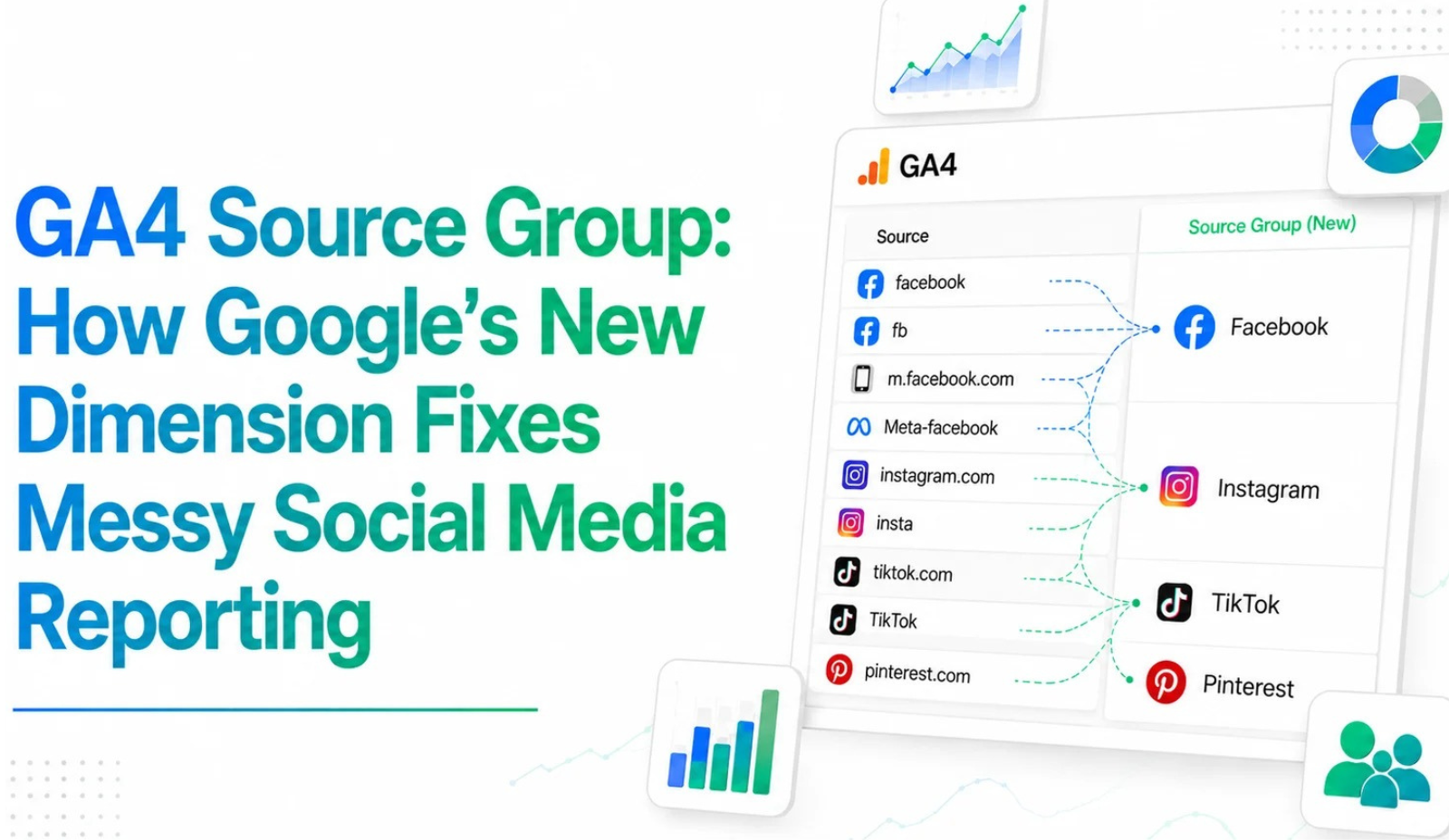
If you have spent any real time inside Google Analytics 4, you already know the pain. You open your Traffic Acquisition report to check how Facebook is performing, and instead of one clean row, you find three or four: “facebook,” “fb,” “m.facebook.com,” maybe even a stray “Meta-facebook” thrown in for good measure. Each one carries its own sessions, its own conversions, its own cost-per-acquisition math and none of them, on their own, tells you what the campaign actually delivered.
On June 11, 2026, Google quietly rolled out a fix for exactly this problem: a new dimension called Source Group, announced through the official Google Analytics “What’s new” release notes. It looks like a small addition on paper. But if you’ve ever had to explain to a client why their “Facebook performance” was split across four rows, you know it solves a headache that has existed since GA4 first replaced Universal Analytics.
What Is the GA4 Source Group Dimension?
Put simply, Source Group is a built-in GA4 dimension that automatically consolidates the many raw variations of a traffic source into one standardized platform name. For years, analysts handled this manually building custom channel groups or writing regex rules to combine every version of “Facebook” they could think of. GA4 now does that grouping on its own, straight out of the box, no extra setup on your end.
Google’s own example makes the point clearly: “facebook,” “fb,” and “Meta-facebook” all used to show up as separate rows. With Source Group active, they collapse into one clean value Facebook. The same logic applies across Instagram, TikTok, Pinterest, Amazon, YouTube, Google Search, Google Maps, and even newer sources like ChatGPT and Perplexity.
No tagging changes are required. No GTM updates, no new UTM structure, no property reconfiguration. Source Group is automatically populated the moment it becomes available on your property, and it works retroactively meaning it applies to your historical data too, not just traffic going forward.
Source Group vs. Source Platform: What's the Difference?
This is where a lot of marketers get confused, because the two dimensions sound almost identical but answer different questions.
Source Group
Source Group identifies where the traffic actually came from the originating platform. If a visitor arrived through Instagram, Source Group labels it Instagram, whether that traffic was paid or organic. It blends both together under one platform name, which is exactly what you want when you’re asking a simple question: how much traffic came from this platform overall?
Source Platform
Source Platform, on the other hand, identifies where you manage the buying activity the advertising ecosystem behind the spend, such as Meta Ads. This field has existed in GA4 for a while, but Google updated its classification logic alongside the Source Group launch so the two dimensions work together more cleanly.
Used together, these two fields let you split organic performance from paid performance without writing a single line of custom logic. Source Group tells you the platform; Source Platform tells you the ad account behind it.
Why This Update Matters for Marketers and Agencies
For anyone running multi-platform campaigns, fragmented source data isn’t just annoying it actively distorts decision-making. If half a campaign’s sessions sit under one source string and the rest sit under another, your CPA calculation is wrong, your channel comparison is wrong, and any budget decision based on that data inherits the error.
Source Group removes a big chunk of that manual cleanup work. Analysts and agency teams no longer need to build and maintain custom channel groupings just to get a trustworthy view of platform-level performance. That time gets redirected toward actual analysis figuring out what’s working, not fixing what’s broken in the data. It’s the same principle we lean on when setting up analytics and reporting for clients: the less time spent wrestling with the data itself, the more time goes into decisions that actually move a campaign forward.
There’s also a growing AI angle here. Google has built recognition for generative AI referral traffic directly into Source Group, explicitly naming ChatGPT and Perplexity as supported platforms. As AI assistants become a more meaningful referral source for websites, having them tracked with the same consistency as Facebook or Google Search is a genuinely useful addition, not just a nice-to-have.
How to Find and Use Source Group in Your Reports
Source Group is rolling out gradually across properties, so if you don’t see it immediately, that’s expected Google is deploying it in phases. Once it lands, you can access it in a few places:
- Standard reports add it as a secondary dimension inside Traffic Acquisition or User Acquisition.
- Explorations select Source Group from the dimensions panel in any free-form or funnel exploration.
- Advertising section use it as a breakdown in conversion and attribution reports.
Because the grouping is retroactive, you can apply it to historical date ranges immediately and run year-over-year comparisons without hitting a data break at the launch date something the earlier AI Assistant channel update (which was forward-facing only) could not offer.
A Few Things to Keep in Mind
Source Group is a convenience layer, not a replacement for clean tagging. It only consolidates source values that Google already recognizes. If your UTM parameters are inconsistent or your paid campaigns are missing a proper medium tag, that traffic can still fall into an “unlabeled” bucket rather than rolling up neatly. The most reliable long-term fix is still consistent UTM tagging at the campaign level. Source Group just makes the reporting layer forgiving of the occasional inconsistency, not immune to it.
It’s also worth noting that this update landed close to another GA4 change around the same time as updates to consent handling between GA4 and Google Ads. The two are unrelated technically, but if your numbers look different than expected in late June 2026, it’s worth checking both changes before assuming something is broken in your account.
We’ve already seen this play out on a couple of client accounts this month. Facebook traffic that used to show up split across three or four source values is now rolling up into one clean row, and it’s made month-over-month comparisons far less of a guessing game during reporting calls.
Frequently Asked Questions
Is Source Group available in all GA4 properties yet? No. Google is rolling it out gradually. If it isn’t visible in your dimension list yet, it should appear over the coming days or weeks.
Do I need to change my tracking setup to use Source Group? No. It’s automatically populated with no tagging or configuration changes required.
Does Source Group replace Source Platform? No. They serve different purposes Source Group shows the originating platform, while Source Platform shows the ad-buying ecosystem behind paid traffic.
Will Source Group fix my historical reports too? Yes. It applies retroactively, so past data is consolidated as well, without breaking year-over-year comparisons.
Final Thoughts
Source Group isn’t going to make headlines the way Google’s AI announcements do, and it doesn’t need to. It quietly fixes a problem marketers have been patching around for years with spreadsheets and custom regex. Cleaner attribution means better budget calls, fewer awkward conversations about mismatched numbers, and more confidence in whatever report lands in front of a client or a manager next. If you handle GA4 for clients or run your own in-house dashboards, it’s worth a two-minute check this week just open your dimension list and see if Source Group has reached your account yet.
Google keeps shipping small changes like this every few weeks, and keeping up with all of them while still running campaigns isn’t easy. That’s exactly the kind of thing we track and handle for our clients at Techbound from staying on top of GA4 updates to turning cleaner data into actual business growth. If you’d rather have someone watching these changes for you, we’re happy to help.