

If you manage Google Ads campaigns, here’s a quick gut check. Have your Target CPA or Target ROAS numbers looked unusually good lately?
Don’t get too comfortable. The Google Ads Smart Bidding update rolling out on August 17, 2026 quietly closes a loophole that many advertisers didn’t even know they were benefiting from. If you don’t act before then, your “great” campaign performance could slide back down to what you actually asked for.
This isn’t a doom-and-gloom warning. It’s a heads-up, and an honest one. Here’s what changed, why Google made the call, and what to do about it, so your reports don’t start looking worse for reasons that have nothing to do with your creative, your landing page, or your targeting.
What Actually Changed in Smart Bidding
To understand this update, it helps to know a quirk that’s existed in Google’s Smart Bidding system for years.
Campaigns marked “Limited by budget” that use Target CPA or Target ROAS bidding didn’t always stick strictly to the target you entered. In practice, this meant the algorithm would often go hunting for the cheapest, highest-quality conversions it could find within your budget cap. Sometimes that meant landing well below your stated Target CPA. Sometimes it meant beating your Target ROAS by a wide margin.
Advertisers noticed the gap, and understandably, nobody complained. Who’s going to argue with a $10 Target CPA actually delivering conversions at $5?
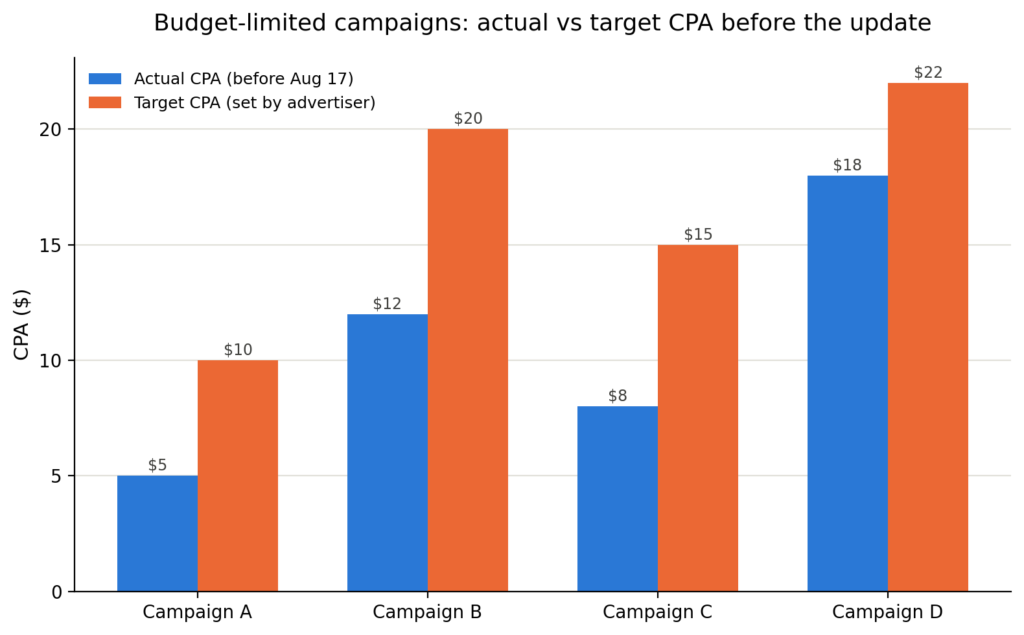
The catch was consistency. The moment you raised your daily budget, that overperformance could vanish or shift unpredictably, because the algorithm suddenly had access to a different pool of auctions. Scaling a campaign became a bit of a gamble, and that’s exactly the pain point Google says it’s fixing.
From August 17, 2026 onward, budget-limited campaigns on Target CPA and Target ROAS will optimize toward the actual number you typed in, not below it. Google’s own example makes this concrete: a campaign with a $10 Target CPA that’s been quietly delivering a $5 CPA will start drifting back up toward $10.
Who This Affects (And Who It Doesn't)
This isn’t a blanket change across every Google Ads account. Before you do anything, check whether it even applies to you.
Campaigns the update touches
- Search, Shopping, Performance Max, Travel, and Demand Gen campaigns (including Demand Gen in Display & Video 360 and Search Ads 360)
- Campaigns using Target CPA or Target ROAS bidding strategies
- Campaigns currently marked “Limited by budget”
- Campaigns that have been consistently beating their stated target
Campaigns it does not affect
- Campaigns with healthy, unconstrained budgets
- Campaigns already performing close to their set target
- App, Video Reach, and Video View campaign types
- Manual CPC or other non-target-based bidding strategies
If your campaigns aren’t budget-limited, or your actual CPA and ROAS are already close to what you set as the target, you probably won’t notice much difference. The advertisers most exposed here are the ones treating their “target” as a loose guideline rather than a real number. Fair enough, honestly. That’s exactly what the old system encouraged.
Why This Is Worth Auditing, Not Just Worrying About
It’s tempting to read this as Google making automated bidding “worse.” That framing misses the point.
The old overperformance was never guaranteed in the first place. It was a side effect of budget constraints, not a feature you could plan a media strategy around. Google’s update makes the whole system more predictable: what you set is what you’ll get, whether or not you raise the budget tomorrow.
That predictability is genuinely useful once the initial disruption settles. Forecasting gets easier. Scaling a campaign stops being a gamble on whether efficiency holds up as spend increases.
Here’s the real opportunity. If your Target CPA has been sitting at $35 while your actual cost per acquisition has been $20 for months, that’s not really a target anymore. It’s an outdated number nobody revisited. This update is a good excuse to ask what the number should actually be, based on your current margins and business goals, instead of a figure someone typed in once and forgot about.
We’ve already started flagging this to a few client accounts this week, and the pattern is consistent: the widest gaps tend to show up on campaigns with targets that haven’t been touched in three to six months.
What To Do Before (or Right After) August 17
Google rolled out a Bid Target Adjustment Tool on July 6, 2026, specifically to help advertisers review affected campaigns ahead of the change. Start there if you haven’t already.
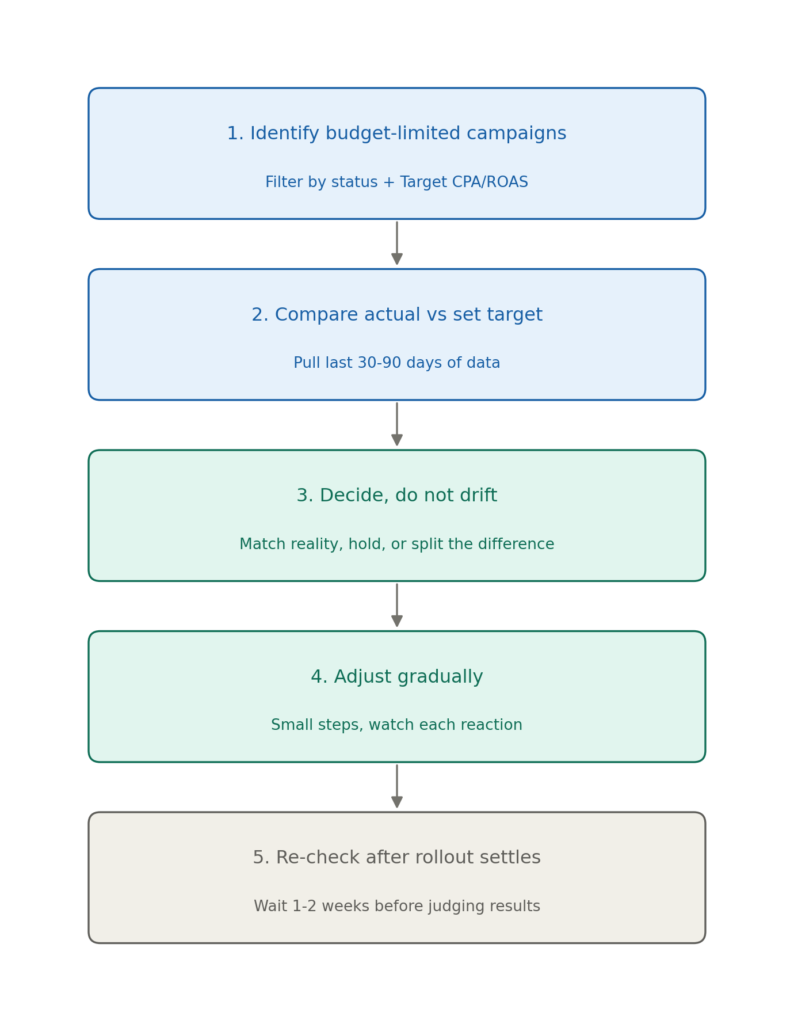
- Identify your budget-limited campaigns. In Google Ads, filter by campaign status and look for “Limited by budget” alongside Target CPA or Target ROAS bidding.
- Compare actual performance to your set target. Pull the last 30 to 90 days of CPA or ROAS data and line it up against the number you originally entered. A wide gap is your signal to act.
- Decide, don’t drift. You broadly have three options. Match reality by updating your target to reflect recent performance, if that number is genuinely sustainable for your margins. Hold your original target if you’re comfortable paying up to that number. Or split the difference by moving the target partway between old and new, which gives you extra volume without a full jump in cost.
- Make changes gradually. Several PPC practitioners tracking this rollout recommend nudging targets in small steps rather than one large adjustment, then watching how the campaign reacts before moving further. Smart Bidding needs room to relearn. A single dramatic change can cause more volatility than the update itself.
- Re-check once the rollout settles. Give it one to two weeks after August 17 before drawing conclusions. Bidding algorithms typically need a short learning period to stabilize around any target change.
The Bigger Picture for PPC and Paid Search Strategy
Updates like this are a good reminder that “set it and forget it” bidding is a myth, even with machine learning doing most of the heavy lifting. Smart Bidding, Maximize Conversions, and every other automated bid strategy are only as smart as the inputs you give them. A target you set eight months ago, based on assumptions that may no longer hold, isn’t really guiding anything anymore.
If you manage paid search or performance marketing accounts, the ten minutes it takes to check your budget-limited campaigns this week is worth far more than the hours you’ll spend later explaining a cost spike to a client.
Frequently Asked Questions
Will Google automatically change my bidding targets or budgets?
No. Google has confirmed it won’t adjust your targets or budgets on its own. The underlying bidding behavior changes on August 17, but updating your actual target numbers is on you.
What happens if I do nothing before August 17?
If your budget-limited Target CPA or Target ROAS campaign has been beating its stated target, performance will gradually drift back toward the number you originally entered. In practice, that usually means a higher cost per conversion or a lower return on ad spend than you’ve gotten used to.
Does this update affect Manual CPC or Target Impression Share campaigns?
No. This change is specific to target-based bid strategies, mainly Target CPA and Target ROAS, plus Target CPC for Demand Gen, on campaigns marked “Limited by budget.” Manual bidding and Target Impression Share strategies work exactly as they do today.
Is this the same as a full Smart Bidding overhaul?
Not quite. It’s a narrower change to how budget-limited campaigns interpret your stated target. The core Smart Bidding auction mechanics aren’t changing, only how strictly the system holds to the number you entered.
Not Sure If Your Campaigns Are Exposed?
This kind of update is easy to miss until a client asks why cost per lead jumped. If you’d rather not find out the hard way, Techbound can run a quick account audit and tell you exactly which Target CPA and Target ROAS campaigns are affected, and what adjustment, if any, actually makes sense for your goals. We manage performance marketing and Google Ads accounts for our clients, and this is precisely the kind of platform change we build into our monthly account reviews so nothing catches you off guard.