
- May 5, 2026
- by Kishore
Common eCommerce SEO Mistakes That Hurt Rankings and Conversions
Running an online store is not only about listing products and waiting for customers to buy. If your site is difficult to find on search engines or creates a poor shopping experience, you may struggle to attract visitors and convert them into paying customers. Many businesses invest heavily in design and advertising yet overlook the basics of bold Ecommerce SEO that directly influence visibility and revenue.
Small SEO mistakes can quietly damage your rankings, reduce trust and lower conversions over time. Whether you manage a small online shop or a large ecommerce website, understanding these issues can help you improve search performance and create a smoother buying journey for customers. This guide explains the most common mistakes businesses make and how you can avoid them to support stronger traffic growth and better online sales.
Ignoring Search Intent
One of the biggest mistakes in SEO is focusing only on keywords without understanding what customers actually want when they search.
For example, imagine you sell skincare products and create a product page targeting the keyword “best sunscreen for oily skin”. If the page only contains a short product description and a buy button, it may not rank well. People searching this term often want comparisons, ingredient details and advice before purchasing.
To improve this:
Write Helpful Product Descriptions:
Instead of writing “Lightweight sunscreen with SPF 50”, explain how the product performs during humid weather, whether it leaves a white cast or how long it lasts during outdoor use. This supports better product optimization and gives users useful buying information.
Answer Common Questions:
If customers frequently ask whether a product suits sensitive skin or works under makeup, include those answers directly on the page.
When your content matches search intent, visitors stay longer on the page which can improve rankings and conversions.
Using Duplicate Product Content
Many online stores copy product descriptions directly from suppliers. This is especially common in electronics, fashion and beauty industries.
For instance, if 200 websites use the exact same description for a wireless headset, search engines struggle to identify which page offers the most value. Your page may never rank well even if your prices are competitive.
How To Fix This Problem
Rewrite Descriptions In Your Own Voice:
Instead of repeating manufacturer details, explain how the product solves a problem for the customer.
Highlight Unique Selling Points:
If you offer faster delivery, exclusive bundles or extended warranties, mention them clearly.
Include Customer-Focused Explanations:
A technical description saying “battery lasts 12 hours” is less useful than explaining that the headset can last through long work shifts or flights without charging.
Add Original FAQs And Usage Tips:
For example, explain whether the product works with certain devices or how customers can maintain it for longer use.
Unique content helps search engines understand that your page offers something different from competitors.
Poor Site Structure And Navigation
A confusing site layout can hurt both rankings and conversions. If visitors cannot find products quickly, they may leave your store without making a purchase.
For example, some online fashion stores place products under vague categories such as “New Arrivals” or “Trending”. Customers searching for formal shoes may struggle to find the correct section.
Search engines also struggle to crawl poorly organised websites.
Signs Of Weak Navigation
- Too many product categories
- Broken internal links
- Important pages buried deep within the site
- No breadcrumb navigation
Best Practices For Better Navigation
Keep Category Structures Simple:
Instead of placing products under five layers of categories, keep the path shorter and easier to follow.
- Use Clear Menu Labels:
A label such as “Women’s Running Shoes” is far clearer than a vague term like “Performance”. - Link Related Products Together:
If someone views a laptop, suggest compatible accessories such as keyboards or laptop bags. - Create Collections Based On Customer Behaviour:
For example, group products into collections like “Work From Home Essentials” or “Summer Travel Gear”.
A clean structure improves user experience and helps search engines index pages more effectively.
Slow Website Speed
Page speed directly affects both SEO and customer behaviour. A slow-loading ecommerce website often leads to higher bounce rates and abandoned carts.
Imagine a customer clicking on a furniture product page that takes eight seconds to load because of oversized images. Many users will leave before the page even appears.
Common Causes Of Slow Speed
- Large image files
- Excessive plugins
- Poor hosting services
- Unoptimised code
Add Your Heading Text Here
- Compress Product Images:
Large product photos should be optimised without reducing quality too heavily. - Use Modern Image Formats:
Formats such as WebP can reduce file sizes significantly. - Reduce Unnecessary Scripts:
Too many pop-ups and tracking tools can slow down pages. - Enable Browser Caching:
This helps returning visitors load pages faster.
Even a one-second improvement in loading time can reduce cart abandonment and improve online sales.
Neglecting Mobile Optimisation
Many shoppers now browse and buy products using smartphones. If your website performs poorly on mobile devices, you risk losing both traffic and sales. A common example is checkout forms that require too much typing on mobile screens. Customers often abandon purchases when the process feels frustrating.
Common mobile issues include:
- Text that is difficult to read
- Buttons placed too close together
- Slow mobile loading times
- Difficult checkout processes
How To Improve Mobile Experience
Use Responsive Design:
Your layout should adjust automatically across devices.
- Simplify Navigation Menus:
Avoid overcrowded menus that are difficult to tap on smaller screens. - Make Checkout Forms Shorter:
Remove unnecessary form fields that slow down purchases. - Test Product Pages On Different Screen Sizes:
A page that looks good on desktop may still perform poorly on mobile.
Mobile usability strongly affects both rankings and conversions.
Weak Product Page Optimisation
Product pages are often the main drivers of revenue. Yet many businesses fail to optimise them properly.
Strong product optimization goes beyond adding keywords to titles.
Important Areas To Improve
- Product Titles:
A title such as “Nike Air Zoom Pegasus 40 Men’s Running Shoes” performs better than simply writing “Running Shoes”. - Meta Descriptions:
Instead of generic text, explain the value clearly. Example: “Lightweight running shoes designed for long-distance comfort and daily training.” - Product Images:
Show products from multiple angles and add descriptive alt text. - Customer Reviews:
Reviews often contain natural keyword variations and build buyer trust. - Clear Calls To Action:
Buttons such as “Add To Basket” should be easy to find without excessive scrolling.
Well-optimised pages support stronger rankings while increasing conversions.
Ignoring Technical SEO Issues
Technical SEO problems can quietly damage visibility even if your content is strong.
For example, an online store with thousands of products may accidentally create multiple URLs for the same page through filtering options. This can confuse search engines and weaken rankings.
Common Technical Problems
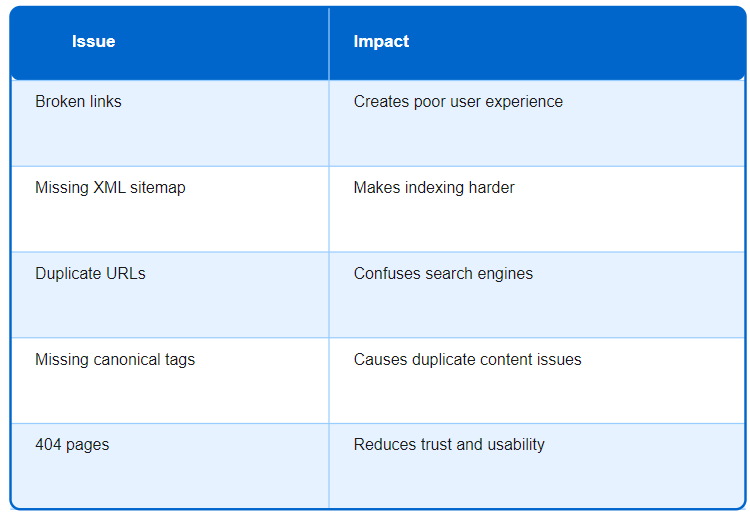
What You Should Do
Carry out regular technical audits to identify problems early. For example, if a discontinued product page is deleted without redirection, customers may land on a 404 page from search results. Redirecting users to related products creates a better experience and preserves SEO value.
Overlooking Internal Linking
Internal linking helps search engines understand the relationship between pages. It also keeps visitors exploring your website longer.
For example, if you publish a blog about “best laptops for students” but never link to your laptop category pages, you miss an opportunity to guide visitors towards products.
Smart Internal Linking Strategies
- Link related products together
- Connect blog content to category pages
- Add “customers also viewed” sections
- Use descriptive anchor text
Good internal linking can increase page views and help customers discover more products naturally.
Forgetting About Category Page SEO
Some businesses focus only on product pages and ignore category pages. However, category pages often target broader search terms with high traffic potential.
For example, a category page for “wireless earbuds” can attract users searching broadly before they decide on a specific model.
How To Optimise Category Pages
- Add short introductory content
- Use clear headings
- Include filtering options
- Optimise metadata properly
Adding a short introduction explaining the product category can help search engines understand the page context while helping users navigate options more easily.
Poor Use Of Keywords
Keywords still matter, but overusing them creates unnatural content that damages readability.
For example, repeating “cheap gaming laptops online” multiple times across a product page makes the content look spammy and difficult to read.
Better Keyword Practices
- Use keywords in headings where relevant
- Include variations naturally
- Prioritise readability over repetition
- Write for people first
Search engines now focus more on content quality and relevance than keyword repetition alone.
Ignoring Customer Trust Signals
SEO may bring visitors to your site, but trust influences whether they buy from you. Imagine finding a product page with no reviews, unclear return policies and no visible contact information. Many customers will leave without purchasing.
Important Trust Elements
- Secure HTTPS connection
- Transparent return policies
- Customer reviews
- Visible contact details
- Clear shipping information
Trust-building elements reduce hesitation and encourage customers to complete purchases.
Weak Content Strategy
Some online stores rely only on product listings and ignore educational content. For example, a store selling coffee machines could publish guides such as “How To Choose A Coffee Machine For Small Kitchens”. This type of content attracts visitors earlier in the buying journey.
Valuable Content Ideas
- Buying guides
- Product comparison articles
- Industry tips
- Frequently asked questions
Helpful content supports long-term SEO growth and positions your brand as a reliable source of information.
Not Tracking SEO Performance
Without tracking performance, it becomes difficult to know what is working and what needs improvement.
For example, if your product pages receive traffic but conversions remain low, the issue may be weak product descriptions or a complicated checkout process rather than poor rankings.
Important Metrics To Monitor
- Organic traffic
- Bounce rates
- Conversion rates
- Keyword rankings
- Cart abandonment rates
Tools like Google Analytics help you understand customer behaviour and identify opportunities for improvement.
Regular analysis allows you to adjust your strategy based on real data rather than assumptions.
Conclusion
Avoiding common SEO mistakes can significantly improve both search visibility and customer experience. Many issues such as duplicate product descriptions, slow-loading pages and weak site navigation directly affect how users interact with your store. Fixing these problems can help search engines understand your pages better while making it easier for customers to complete purchases.
A strong SEO strategy is not only about rankings. It also involves creating useful content, improving technical performance and building trust throughout the buying journey. By focusing on practical improvements and real customer needs, you can build a stronger foundation for long-term growth and more consistent conversions.
Ready to scale your online store and avoid these costly pitfalls? Connect with the best eCommerce SEO company in Trivandrum, TechBound, to optimize your path to success.
